 Langless
How to translate any meeting in real time (Zoom, Teams and Meet)
Want to translate any meeting in real time and take part in another language without relying on an interpreter? Langless does live voice translation, in both directions, inside the call app you already use — Zoom, Microsoft Teams, Google Meet or any other on your computer. This is the general guide to the method: how it works, what it costs, and when it does (or doesn’t) replace a human interpreter.
Ready to speak any language?
Get started free in minutes. Live voice translation, no human interpreter.
Open LanglessHow real-time meeting translation works
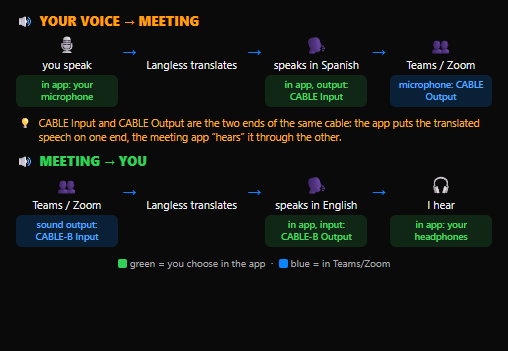
Langless isn’t a plugin that lives inside Zoom or Teams. It runs in your browser, alongside your call, and connects audio through a virtual audio cable — an audio driver (VB-CABLE on Windows, BlackHole on Mac; the basic one is free).
The flow is simple and bidirectional:
- You speak in your language → Langless translates → your voice enters the meeting translated through the virtual cable (which you select as the microphone).
- The others speak in their language → Langless captures the meeting audio → you hear it translated into your language.
Because the audio passes through a neutral cable, the same method works the same way in any call app. The other participants don’t have to install anything: to them, it’s like hearing you speak their language.
👉 Try Langless now — get started free
Choose your language and the other person’s
In the app, you open the Meeting tab and set two global languages: yours and the other person’s. From there, Langless translates in both directions automatically, across dozens of languages. There’s no need to set a language per participant on every turn.

Per-platform guides
The steps only change in each app’s audio settings. Pick yours:
- Translate a Zoom meeting — select the virtual cable as the microphone in Zoom.
- Translate a Microsoft Teams meeting — works in the installed app and Teams web, with no IT approval.
- Translate a Google Meet meeting — because it runs in a browser tab, it often skips the 2nd cable.
Before anything else, it helps to understand the common prerequisite: what a virtual audio cable is, why it’s safe, and what it costs (the basic one is free; only in desktop apps might a paid 2nd cable come into play).
How much it costs
There are two costs, separate and transparent:
- Langless subscription: from US$ 25/month, with per-seat/team plans. See the plans.
- AI minutes (BYOK): you use your own key (OpenAI or Gemini) and pay for the minutes directly to the provider, from ~US$ 0.03/min, with no markup from us.
Even adding the two together, it’s usually a fraction of the cost of a simultaneous interpreter — and available on demand, with nothing to schedule. There’s a 14-day guarantee and you can cancel any time.
When NOT to use it (and prefer a human interpreter)
AI translation is excellent for work meetings, sales, support, training and day-to-day alignment. But be honest about the limits: in legal, diplomatic, critical medical or very high-risk settings — where a single word changes the outcome and there’s legal liability — a certified human interpreter is still the right choice.
To understand the differences in accuracy, cost and availability, read human interpreter vs. AI. Many teams use both: AI day to day, a human for the decisive moments.
Ready to speak any language?
Get started free in minutes. Live voice translation, no human interpreter.
Open Langless✓ 14-day guarantee · ✓ Cancel anytime · ✓ Secure payment via Paddle