 Langless
How to translate a Zoom meeting in real time
Need to join a Zoom meeting in another language and understand — and be understood — instantly? With Langless you translate your own voice and the other person’s live, right inside Zoom, without hiring a human interpreter and without leaving the call. Here’s how to set it up in a few minutes.
Ready to speak any language?
Get started free in minutes. Live voice translation, no human interpreter.
Open LanglessWhat you’ll need
- Zoom on your computer (Windows or macOS).
- Langless open in your browser, in Meeting mode.
- An AI provider key (BYOK) — you pay for the minutes directly to the provider, with no markup from us.
- A virtual audio cable (an audio driver; the basic one is free): the app itself walks you through the install step by step. See what a virtual audio cable is and what it costs.
👉 Try Langless now — get started free
Step by step to translate Zoom
- Open Langless and select Meeting mode.
- Install the virtual audio cable by following the on-screen guide (a one-time step).
- Choose your language and the other person’s language.
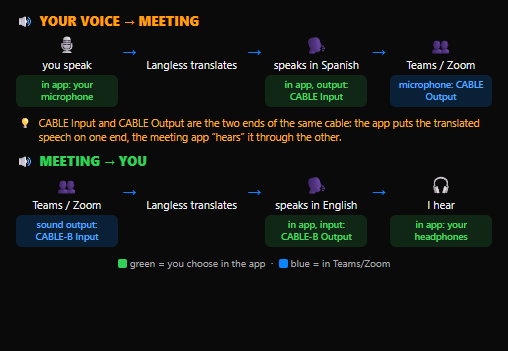
- In Zoom, select the virtual cable as the microphone (and, as the guide explains, as the speaker).
- Start talking: your voice goes out translated in Zoom, and what the others say comes back translated for you.

It works both ways
The translation is bidirectional: what you say goes into the meeting translated, and what the others say comes back in your language, in real time. No one else on the call has to install anything — to the other participants, it sounds like you speaking their language.
How much it costs
Meeting mode is part of the Langless plans (from US$ 25/month). The translation itself runs on your own AI key (BYOK): you pay per minute directly to the provider (from ~US$ 0.03/min), with no markup from us. In practice, it works out to a fraction of the cost of a human interpreter — and it’s available any time, with nothing to schedule.
Tips for a better translation
- Use headphones to avoid echo and to keep the microphone from picking up the translated audio.
- Speak in complete sentences with natural pauses — it helps the AI translate with context.
- Make sure you have a stable connection to keep the translation flowing smoothly.
Ready to speak any language?
Get started free in minutes. Live voice translation, no human interpreter.
Open Langless✓ 14-day guarantee · ✓ Cancel anytime · ✓ Secure payment via Paddle