 Langless
How to translate a Google Meet meeting in real time
About to join a Google Meet call with people who speak another language and need to understand — and be understood — on the spot? With Langless you translate your own voice and the other participants’ live, right inside Meet, without a human interpreter. And because Google Meet runs in the browser, there’s a shortcut: the app can capture the tab audio directly, often making the second cable unnecessary. Here’s how to set it up.
Ready to speak any language?
Get started free in minutes. Live voice translation, no human interpreter.
Open LanglessWhat you’ll need
- Google Meet open in the browser on your computer (Windows or macOS).
- Langless in your browser, in Meeting mode.
- An AI provider key (BYOK) — you pay for the minutes directly to the provider, with no markup from us. See what BYOK is.
- A virtual audio cable (an audio driver; the basic one is free) so your voice goes out translated. The install is guided right inside the app — learn what a virtual audio cable is and what it costs.
👉 Try Langless now — get started free
In Meet you can capture the tab audio (no 2nd cable)
This is Google Meet’s biggest advantage: because it runs inside a browser tab, Langless can capture the meeting audio straight from the tab, with no need for a second virtual cable on the input side.
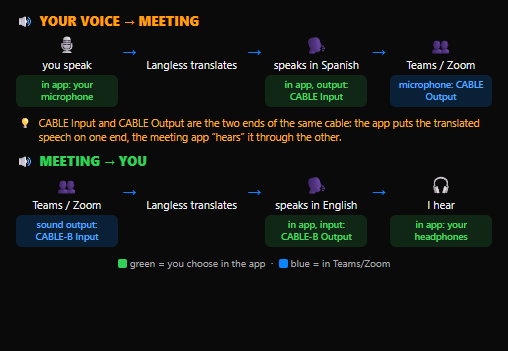
In practice, audio works in both directions with less setup:
- Your voice → Meet: goes out translated through the virtual audio cable, which you select as the microphone in Meet.
- Meet → you: Langless captures the meeting tab audio and translates it into your language, with no second cable.
When you use Meet in a desktop app or another window that can’t be captured as a tab, the path is the same as Zoom and Teams: both sides through the virtual cable.
Step by step to translate Google Meet
- Open Langless and select Meeting mode.
- Install the virtual audio cable by following the on-screen guide (a one-time step).
- Choose your language and the other person’s language.
- In the app, choose to capture the tab audio from Google Meet (so you skip the 2nd cable).
- In Google Meet, under Settings > Audio, select the virtual cable as the microphone.
- Speak: your voice goes out translated in Meet, and what the others say comes back translated for you, in real time.

How much it costs
Meeting mode is part of the Langless plans (from US$ 25/month). The translation runs on your own AI key (BYOK): you pay per minute directly to the provider (from ~US$ 0.03/min), with no markup from us. It comes to a fraction of the cost of a simultaneous interpreter and it’s available any time, with nothing to schedule.
Tips for a better translation
- Use headphones to avoid echo and to keep the microphone from picking up the translated audio.
- Speak in complete sentences, with natural pauses — the AI translates better with context.
- Keep the Meet tab active so tab audio capture works without interruptions.
Ready to speak any language?
Get started free in minutes. Live voice translation, no human interpreter.
Open Langless✓ 14-day guarantee · ✓ Cancel anytime · ✓ Secure payment via Paddle