 Langless
Virtual audio cable: what it is and how to translate any meeting
To translate a meeting in real time, Langless has to "pass" audio between two programs on your computer: the translation app and the call app (Zoom, Teams, Meet). What bridges them is the virtual audio cable — a small audio driver that connects one program’s output to another’s input, with no physical wire at all. This is the pillar guide of our setup cluster: here you’ll understand the concept and then move on to installing it on your system.
Ready to speak any language?
Get started free in minutes. Live voice translation, no human interpreter.
Open LanglessWhat a virtual audio cable is
Despite the name, it’s not a physical cable. It’s a piece of software (a "driver") that creates fake audio devices on your operating system. To Windows or macOS, they show up as if they were a real microphone and speaker — but instead of recording or playing sound in the real world, they route audio from one program to another.
It’s like plugging one program’s headphone output straight into another program’s microphone input, except it all happens in software. The sound never goes out through a speaker or in through a real microphone: it travels internally, with no loss.
👉 Try Langless now — get started free
Why Meeting mode needs it
In Meeting mode, Langless has to do two things at once:
- Deliver your translated voice into the call. Instead of Zoom listening to your real microphone, it now listens to the virtual cable — where Langless drops the already-translated audio.
- Receive the other participants’ speech to translate. The audio coming out of the meeting is routed back to Langless, which translates it and returns it in your language.
Without this bridge, Zoom could only hear your microphone directly, with no translation in between. The virtual cable is what makes live, two-way translation possible.
How the two-way flow works
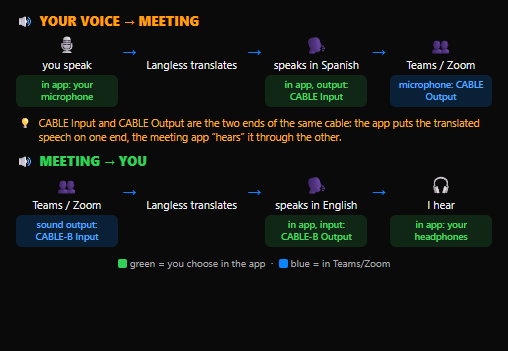
The cable usually comes with two ends. Think of it this way:
- Your voice → meeting: Langless sends the translated audio to the cable’s input end (in VB-CABLE, called
CABLE Input). In the call app, you choose the cable’s output end (CABLE Output) as the microphone. Result: the others hear you in their language. - Meeting → you: the others’ speech is captured and translated by Langless, which returns it in your language to your headphones.
The app itself walks you through all of this on screen. You don’t have to memorize anything — you just install the cable once.
Which cable to use on each system
Each operating system has its recommended free cable:
- Windows: VB-CABLE. See how to install VB-CABLE on Windows.
- macOS: BlackHole. See how to install BlackHole on Mac.
- Linux: a PulseAudio or PipeWire null-sink, which already ships with most distributions.
All of them are free and play the same role. Langless simply uses whichever cable you install.
What if the meeting is in a browser tab?
When the call happens in a browser tab (for example, Google Meet or Zoom on the web), Langless can capture the tab audio directly, which can make the second cable unnecessary for the "meeting → you" direction. You still use the cable to send your translated voice. The app shows on screen which setup to use in each case.
Worth remembering: Meeting mode needs a Chromium browser (Google Chrome or Microsoft Edge) on a computer.
How much it costs
The basic cable is free — VB-CABLE (Windows), BlackHole (Mac) and the Linux tools cost nothing and solve most cases. There’s one optional detail:
- Basic cable: free. It’s already enough to send your translated voice. When the meeting is in a browser tab (Meet, or Zoom/Teams on the web), the app captures the tab audio and skips a 2nd cable.
- 2nd cable (optional, only in desktop apps): may have a cost. For cleaner audio return in installed apps (Zoom/Teams on desktop) you use a second virtual cable. On Windows, the extra VB-Audio cable (VB-CABLE A+B) is paid — a contribution from ~€5. On Mac/Linux you can build the 2nd path for free (BlackHole/null-sink).
Beyond that, the Langless costs are the subscription (from US$ 25/month) and the translation minutes on your own AI key (BYOK), from ~US$ 0.03/min directly to the provider, with no markup — see what BYOK is and how much it costs to translate a meeting with AI.
Ready to speak any language?
Get started free in minutes. Live voice translation, no human interpreter.
Open Langless✓ 14-day guarantee · ✓ Cancel anytime · ✓ Secure payment via Paddle